
Marquee Sports Network
Marquee Sports NetworkSports
2.7717.00 Reviews
- Version
- 26.7.4
- Installs
- 100.00K
- Age Rating
- Everyone
Screenshots
Our Review of Marquee Sports Network
 Analysis by Appyee
I think the key question with Marquee Sports Network is not whether it has enough Cubs-related material, but whether it fits the way you actually watch baseball. I’d treat it as a team-focused companion for following Chicago, rather than a general sports app: its appeal is strongest when the Cubs are the reason you opened your phone in the first place. That distinction matters if you’re deciding between a dedicated local network app and a broader service that spreads its attention across many leagues and teams.
What to expect from speed
For a live game, a steady connection is more important than a particularly powerful phone. Streaming video can use a lot of mobile data, so I’d check whether you’re on Wi-Fi before settling in for a full broadcast away from home. If you do rely on cellular service, keeping an eye on your data allowance is a sensible habit. A few highlights are a different commitment from watching several innings, and planning around that can prevent the app from becoming an unpleasant surprise later.
There is also a natural delay in watching a stream compared with following a game in real time through a nearby broadcast or live updates. If you’re sharing a game with friends who are watching elsewhere, messages or score alerts may arrive ahead of the picture. I’d mute notifications from other baseball sources during a close finish if spoilers bother you; the app can be your viewing destination without being the only place you get updates.
When a viewing session gets demanding
A short check-in and a full game are very different tests for any video app. For quick breaks, highlights or a studio segment are easier to fit around the day than keeping a live stream open. For a longer session, I’d start on a reliable network, make sure the phone has enough charge, and avoid relying on a weak connection just because a game has already begun. Those small preparations are more useful than assuming the app can overcome every limitation of the place you happen to be watching from.
For example, if I were following an evening game while commuting, I’d decide in advance whether I want the live broadcast or simply a later recap. A moving train or a drive through areas with patchy reception can interrupt video, and a passenger should never handle a phone while a vehicle is moving. If the stream becomes inconvenient, switching to a shorter piece of content or returning to the game after reaching a stable connection is a more practical plan than repeatedly fighting a poor signal.
Reliability and the cost of access
My overall impression of an app should be balanced against what it asks of a fan. Marquee Sports Network is free to download, but some content can involve access through a TV provider, and in-app purchases are listed at $19.99 per item. I’d check the access route that applies to me before planning a watch party around the app. A download alone should not be treated as a promise that every live broadcast will be available without additional eligibility or payment.
That distinction also helps explain why one fan may find the app straightforward while another runs into a login step. If you already use a participating TV service, signing in may be a routine one-time task; if you don’t, it is worth confirming what you can watch before counting on the app as your only way to follow a game. I would keep account details handy for a first setup, then test access before game time rather than discovering a sign-in hurdle during the first inning.
The app has an average rating of 3.4 from around 826 ratings, alongside more than 600 written reviews. I read that as a reminder to set realistic expectations, not as a definitive verdict on every device or connection. Ratings can reflect very different viewing circumstances, including account access and network quality. Marquee Sports Network has passed 100,000 installs, so it has found an audience, but popularity alone does not guarantee a flawless session for every fan.
Device fit and practical limits
The app is in the sports category and is developed by Marquee Sports Network. Its current version is 26.6.0, and it supports Android 7.0 and later. It is rated for Everyone, which makes its audience broad, though the actual value still depends on whether you follow the Cubs and can access the content you want. If your phone is older, checking that it meets the minimum operating-system requirement is the first practical step before troubleshooting playback.
I’d also think about where the picture needs to end up. Watching on a phone is convenient when you’re away from a television, while casting can make more sense when several people want to follow a game together. The original experience I had with casting was useful, but I would test that setup before guests arrive rather than assume the phone, network and display will cooperate at the last moment. For quiet, quick viewing, headphones and a small screen are often simpler than turning a casual update into a living-room setup.
Your All-Access Pass to Cubs Content
Have you ever been stuck in a situation where you’re dying to catch the latest Cubs game, but you're nowhere near a TV? Well, I’ve got just the app for you! Let me tell you about the Marquee Sports Network app. I downloaded it last week, and it’s been a game-changer for my sports-watching experience.
So, what’s the deal with the Marquee Sports Network? At its core, it’s designed to be your go-to destination for everything Chicago Cubs. Whether it's live games, exclusive interviews, or behind-the-scenes content, this app has it all. And, let’s be honest, who doesn’t love a little behind-the-scenes action?
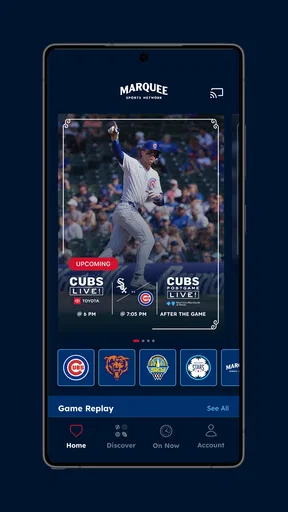
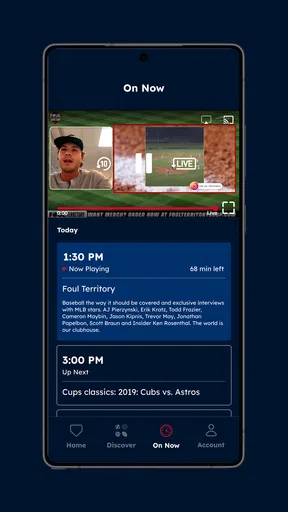
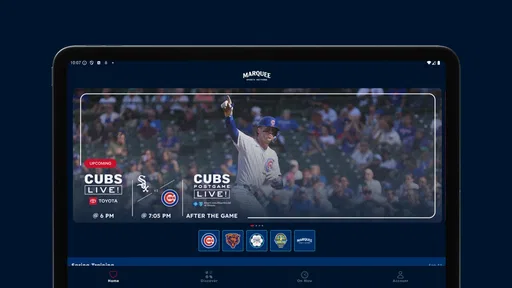
Once you launch the app, you’re greeted with a clean and intuitive interface. Everything is laid out in a way that makes it super easy to find what you’re looking for. The main screen showcases the latest news and highlights, so you're always up-to-date. Plus, there's a handy schedule feature that lets you know when the next game is airing. No more missing out on those nail-biting ninth innings!
Live Streaming and On-Demand Content
One of the standout features of the app is its live streaming capability. As long as you have an internet connection, you can watch Cubs games live, no matter where you are. This came in clutch for me during a recent road trip. I was stuck in the passenger seat, but that didn’t stop me from catching every pitch.
But wait, there’s more! If you’re like me and sometimes life gets in the way, the app also offers on-demand content. Whether you missed a game or just want to rewatch a memorable moment, the app’s got you covered. You can watch full games, highlights, and special features whenever you want.
Exclusive Content for Cubs Fans
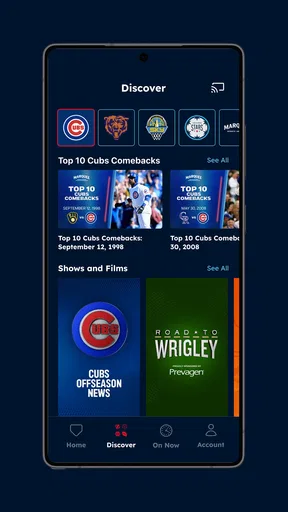
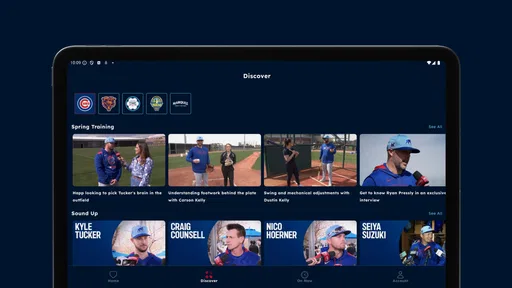
Now, here’s where the Marquee Sports Network really shines. It’s not just about the games; it provides a treasure trove of exclusive Cubs content. The app offers player interviews, documentaries, and even classic games for those who love a bit of nostalgia. I found myself getting lost in a documentary about the Cubs' 2016 World Series win—what a time to be alive!
The app also includes features like expert analysis and pre-game shows. It’s like having your own personal sports commentator in your pocket. For those who want to dive deeper into the stats, there’s plenty of that too. The app provides all the numbers and charts you could want, making it perfect for the die-hard fans.
User Experience and Accessibility
From a user perspective, the app is pretty solid. It’s available on both Android and iOS, which is great for inclusivity. I tested it on my Android phone, and the streaming quality was top-notch. No buffering, no lag, just smooth sailing.
The app is also designed to be very accessible. The layout is straightforward, and the navigation is intuitive. Even if you’re not tech-savvy, you’ll find your way around with ease. Plus, the app supports Chromecast, so you can easily cast the game to a larger screen if you prefer.
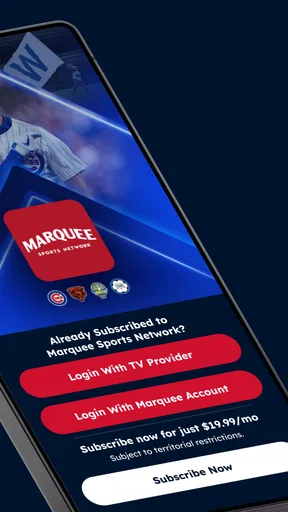
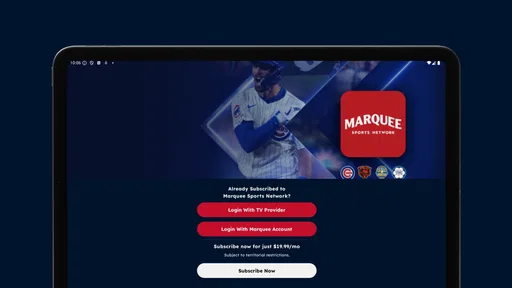
I did notice that the app occasionally requires you to log in with your TV provider credentials. While this might be a slight inconvenience for some, it’s a small price to pay for all the content you get access to.
Who will get the most out of it?
I’d recommend this app most readily to Cubs fans who want their team’s coverage in one place and are comfortable watching on a phone or casting to a larger screen. It can also suit someone who cannot follow a whole game live but likes to catch up through highlights, interviews or a replay when there is time. The mix of live viewing and team-focused material gives it a different purpose from a general sports news app, which may cover more teams but is less centered on the Cubs.
On the other hand, I wouldn’t choose it as my main sports app if I wanted broad coverage across many teams or leagues. A general sports service is a better fit for that kind of browsing. I’d also look elsewhere if I had no interest in the Cubs, or if I expected a free download to guarantee access to every live game without checking the provider requirements. The app’s focus is its strength for a committed fan, but that same focus narrows its usefulness for everyone else.
A more useful way to fit it into the day
One practical approach is to use the schedule as a planning tool rather than opening the app only after a game has started. If I know I’ll be away from a television, I can decide whether the live broadcast is realistic on the connection I’ll have, or whether highlights and on-demand viewing make more sense later. That simple choice helps avoid spending the first part of a game wrestling with reception or account access.
For a family evening or a small get-together, I’d test the casting path before the game and keep the phone available as the control screen. For a quick lunch break, I’d pick a short highlight or studio segment rather than start a full game I cannot finish. Those are small distinctions, but they make a team-specific app feel more useful: it can serve as a full viewing option when conditions suit, and as a catch-up destination when they do not.
There is a trade-off in having so much of the experience built around one club. If I want deeper Cubs coverage, that focus is welcome; I don’t have to sift through unrelated sports to find the team’s material. If I’m only casually interested, though, the same concentration may leave me with less reason to open the app between games. I’d think of it as a focused part of my sports routine, not a replacement for every source of scores, news and live events.
My performance verdict
In my experience, the app is most satisfying when the phone, connection and viewing plan are all working in its favor. A clear interface and access to live and on-demand Cubs programming make it a useful option for fans who want more than a score update. At the same time, streaming is inherently dependent on network conditions, and TV-provider sign-in can add friction. I would not judge a bad session solely by the app if I were watching through weak reception, but I also would not promise that every session will be smooth.
If playback stalls, I’d first check whether other video or web content is also struggling, then try a steadier Wi-Fi connection and reopen the stream. If the problem appears tied to access rather than the connection, confirming the account sign-in is a more sensible next step than repeatedly restarting the phone. These are ordinary troubleshooting steps, not a guarantee of a fix, but they help separate a network issue from an account hurdle without wasting the whole game.
Marquee Sports Network was released on February 14, 2020, and the app remains a specifically Cubs-centered choice rather than an all-purpose sports hub. For me, that makes the decision fairly clear: if Chicago baseball is a regular part of your life and you have a workable way to watch, it deserves a place on your device. If your priority is broad sports coverage, minimal account setup, or watching every event without thinking about connection and eligibility, a broader alternative will likely suit you better.
Wrapping It Up
All in all, the Marquee Sports Network app is a must-have for any Chicago Cubs fan. It brings you closer to the team you love with its array of live and on-demand content, all wrapped up in a user-friendly package. Whether you’re catching a game live or diving into exclusive interviews, this app has something for everyone.
So, if you’re ready to boost your Cubs experience, go ahead and download the app. Trust me; you won’t regret it. Now, if you’ll excuse me, I’ve got a game to catch!
Verdict
Strengths of Marquee Sports Network
- High-quality streaming with minimal buffering.
- Access to live Chicago Cubs games.
- Comprehensive sports coverage and analysis.
- User-friendly interface and navigation.
- Customizable notifications for game alerts.
Limitations of Marquee Sports Network
- Requires a cable subscription for full access.
- Limited availability outside of Chicago region.
- Occasional login issues noted by users.
- No option for offline viewing of content.
- Subscription can be pricey for some users.
Similar Picks in This Category
View All
BeSoccer: Soccer Live Score
BeSoccer apps4.3

Cricbuzz - Live Cricket Scores
Cricbuzz.com3.7

NFL
NFL Enterprises LLC2.4

Da Fit
MO YOUNG LIMITED3.6

ESPN
Disney4.5

LiveScore: Live Sports Scores
LiveScore Limited4.5
Frequently Asked Questions
What is Marquee Sports Network?
Marquee Sports Network is a dedicated sports channel that primarily focuses on delivering live broadcasts, exclusive interviews, and in-depth coverage of the Chicago Cubs and other local sports. The app provides users with access to live games, highlights, and original programming, making it a must-have for sports enthusiasts.
Is Marquee Sports Network available on both Android and iOS?
Yes, Marquee Sports Network is available for download on both Android and iOS platforms. Users can easily access the app via the Google Play Store or Apple App Store, ensuring compatibility with a wide range of devices to enjoy their favorite sports content anywhere.
Does Marquee Sports Network offer live streaming of all games?
Marquee Sports Network offers live streaming of Chicago Cubs games and a variety of other live sports events. However, availability may vary based on your location and broadcast rights. It's recommended to check the app's schedule or your local listings to confirm the availability of specific games.
Is there a subscription fee to use Marquee Sports Network?
While downloading the app is free, accessing live games and certain exclusive content on Marquee Sports Network may require a subscription or authentication through a participating TV provider. Users should verify subscription details and any potential costs before proceeding to ensure they have full access.
What features does Marquee Sports Network offer besides live games?
In addition to live game broadcasts, Marquee Sports Network provides a wide array of features including game highlights, player interviews, behind-the-scenes content, and original programming. The app also offers real-time scores, stats, and news updates to keep users informed and engaged with their favorite teams.
